
How to Convert DXF to KML and View in Google Earth
Viewing your CAD / DXF files in Google Earth is an easy, 2-step process in ExpertGPS Pro mapping software.
 Import your DXF file in ExpertGPS.
Click Import on the File menu in ExpertGPS, and select the DXF file you exported from your CAD software. Select the coordinate format
you used in your CAD software (ExpertGPS supports US State Plane Coordinates, UTM, and many other grid formats) as well as the datum. ExpertGPS
will reproject your data to lat/lon WGS84 (Google Earth's coordinate system) and show your CAD data correctly positioned over the aerial imagery
and topo maps in ExpertGPS.
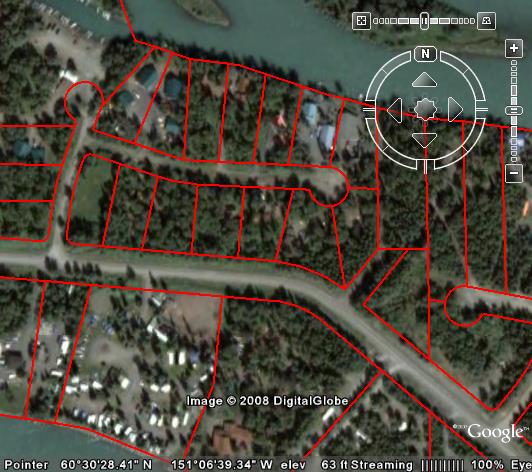
 Press F7, the View in Google Earth command
ExpertGPS will convert your DXF data to KML and automatically launch Google Earth to view your CAD layers. You can also click
Export on the File menu to convert your AutoCAD data to KML.
Google Earth Displaying DXF Parcel Map Showing New Subdivision in Soldotna, Alaska
Three Reasons to Choose ExpertGPS for DXF to KML Conversion
1. ExpertGPS automatically reprojects your DXF data from lat/lon, UTM, or US State Plane Coordinates into Google Earth's native coordinate system.
2. ExpertGPS lets you preview your DXF data over topo maps and aerial photos, so you can clean up your CAD data prior to converting it to KML.
3. ExpertGPS can convert your DXF site plans to GIS shapefiles and GPX format, or send the DXF to your GPS receiver.
Convert KML back to DXF, and other conversions
Of course, ExpertGPS Pro can also convert Google Earth placemarks and KML and KMZ files back to DXF, as well as handle all of your other data file format conversion needs.
How to Convert DWG to KML, or KML to DWG
You will need to open your DWG in AutoCAD or another CAD software program and export it as DXF before ExpertGPS Pro can convert it to KML. You can copy and paste data from Google Earth back into ExpertGPS, convert to DXF, and then import into your CAD software to complete the KML to DWG conversion.
New features were added to ExpertGPS on May 1, 2026
ExpertGPS runs on Windows 11 and Windows 10.
© 1998-2026 TopoGrafix – 24 Kirkland Dr, Stow, MA – Email: support@expertgps.com