
Transfer AutoCAD DXF to your Garmin GPS
It's an easy, two-step process to download any CAD drawing in DXF format to your Garmin GPS receiver with ExpertGPS Pro. Take any ACAD file and create gps waypoints and tracklogs from your CAD drawings that you can send to any Garmin GPS receiver for use in the field.
Send any CAD Drawing Layer to your Garmin GPS
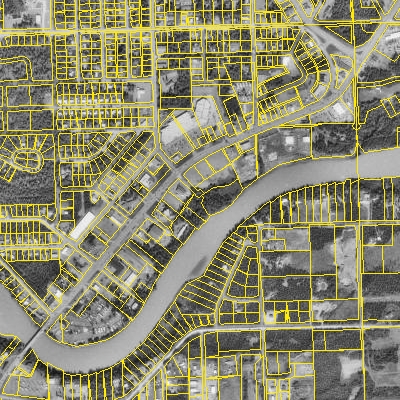
ExpertGPS Pro imports your CAD drawings in DXF format and layers them over seamless aerial photos or USGS topo maps. You can send CAD lines and points directly to any handheld Garmin GPS receiver and print reference maps of your job sites.
In this example, ExpertGPS is displaying parcel data for Soldotna, Alaska, which was imported from a DXF file. ExpertGPS reprojected the CAD drawing from Alaska State Plane Coordinate System, Zone 4, NAD27 (US Survey Feet) to UTM, NAD83 (Meters) so that it could be viewed over an orthophoto of the city and river. Now that the data is in ExpertGPS, individual parcels can be selected and sent to any GPS receiver, making it easy to locate the property boundaries when working in the field.
The best way to transfer AutoCAD drawings or other CAD data to your Garmin GPS receiver is to import your DXF into ExpertGPS mapping software, using Import on the File menu. You can then click Send to GPS to download your DXF data to your Garmin GPS receiver. ExpertGPS Pro automatically reprojects your drawing from UTM, state plane coordinates, or any other projection into your Garmin GPS receiver's native format (latitude and longitude in WGS84 datum) and creates waypoints and tracklogs to guide you out in the field. ExpertGPS gives you the ability to quickly transfer site plans and other engineering drawings to your Garmin GPS. With ExpertGPS, you'll be able to update features by marking GPS waypoints on your next site visit and uploading your Garmin GPS data back to your CAD software.
New features were added to ExpertGPS on May 1, 2026
ExpertGPS runs on Windows 11 and Windows 10.
© 1998-2026 TopoGrafix – 24 Kirkland Dr, Stow, MA – Email: support@expertgps.com